How to Chat on WhatsApp Without Saving the Number (for Businesses and CS Teams)
Saving every customer's number before you can reply is slow, clutters your phone, and falls apart the moment more than one person handles the chats. The good news is that WhatsApp lets you message anyone without saving the number first. This guide covers the simple methods for one-off chats and the business tools that let a whole customer service team do it at scale.
Can You Chat on WhatsApp Without Saving a Number?
Yes, you can message anyone on WhatsApp without saving their number, using WhatsApp's official Click-to-Chat link or a few other built-in tricks.
To the person receiving it, the message arrives normally, showing your name or number like any other chat. Whether you save the contact or not is a choice that exists only on your end. For a business fielding dozens of new numbers a day, this means faster replies and a contact list that stays clean, which matters even more when a team shares the work.
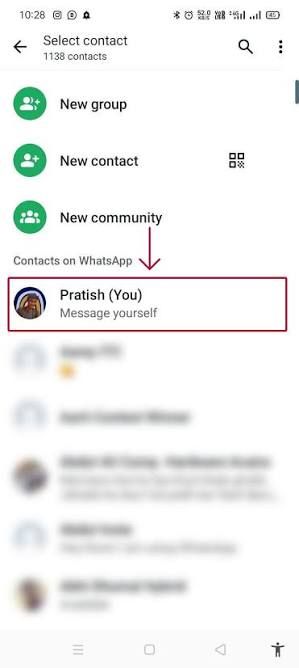
How Do You Message a WhatsApp Number Without Saving It?
The fastest way to message an unsaved number is the wa.me link, WhatsApp's official Click-to-Chat feature. Here are the main methods.
- The wa.me link: In any browser, type
wa.me/followed by the full number with country code, digits only, no plus sign, spaces, or dashes. Press enter, then tap "Continue to Chat" and the conversation opens with the number unsaved. - Message Yourself: Open your own chat in WhatsApp, type or paste the number, and send it. WhatsApp turns it into a clickable link that opens a chat with that person.
- Scan a QR code: If a business displays a WhatsApp QR code, point your camera at it and the chat opens instantly, no typing or saving required.
- WhatsApp Web: On the desktop or web app, use the same Click-to-Chat URL in your browser to open the chat directly.
A useful side effect of the wa.me link is that if the number is not registered on WhatsApp, it shows an error, so the same link doubles as a quick way to check whether a number has an account.
Why Does This Matter for a Business?
For a business, saving every prospect and customer number is not just tedious, it actively gets in the way of fast, organized service.
- Faster first response: Agents reply the moment an inquiry arrives instead of stopping to save a contact.
- A clean, private contact list: One-time buyers and cold leads never clutter personal phones.
- No lost context when staff change: Numbers saved on one employee's phone leave with them; a shared system does not.
- Testing before committing: You can message a prospect to see if they respond before adding them to your CRM.
The catch is that the personal methods above work one number at a time. They are perfect for the occasional chat, but they do not scale to a team handling hundreds of conversations, which is where the limits show. Improving customer service efficiency with AI becomes difficult when every agent is juggling numbers on a personal device.
How Do Businesses Do This at Scale?
At a business level, the answer is not a browser trick but the official WhatsApp Business Platform, better known as the WhatsApp Business API, which is built for messaging customers without saving a single number manually.
The API lets a business receive and reply to messages from any customer through a central system, with no contact saved on anyone's phone. Every conversation lives in software rather than on a device, so the whole team works from the same history. If you are new to it, this overview of everything about the WhatsApp Business API explains how it differs from the regular app and how to apply.
Managing Unsaved-Number Chats With SaleSmartly
The API removes contact-saving, but your team still needs one place to handle the chats.
SaleSmartly connects to the WhatsApp Business API and puts every incoming message in one shared inbox, with a customer profile built automatically from the conversation. Any agent sees who they are talking to and the full history, no contact saved and no personal phone involved, and can assign, tag, or hand off a chat in seconds.
Conclusion
Chatting on WhatsApp without saving a number is simple for individuals: the wa.me link, the Message Yourself trick, or a QR scan all open a chat in seconds. These methods are ideal for the occasional message and keep your contacts clean.
For a business or CS team, the real answer is the WhatsApp Business API paired with a shared inbox, which removes contact-saving entirely and lets everyone work from the same conversation history. Match the method to your need, a quick link for one-off chats, and a proper platform when a whole team is replying to customers every day.
FAQ
Can I send a WhatsApp message without saving the number?
Yes. The easiest way is the wa.me Click-to-Chat link: type wa.me/ followed by the full number with country code, digits only, into any browser, then tap "Continue to Chat." You can also paste the number into your own Message Yourself chat to make it clickable, or scan a business QR code. The number is never added to your contacts.
Will the other person know I did not save their number?
No. On the recipient's side, your message arrives like any normal chat, showing your name or number. Whether you save the contact is entirely a choice on your end and is invisible to them. This is why the method works well for customer service, where saving every inquiry would be impractical.
How can a whole team message customers without saving numbers?
Through the WhatsApp Business API connected to a shared inbox platform. The API routes every customer message into central software instead of a personal phone, so no number is saved manually and the entire team works from the same conversation history. This is how businesses handle high volumes of chats without cluttering devices or losing context when staff change.
What Is a Customer? The Difference Between Customer, Consumer, Buyer, and Client
What is a customer, and how does it differ from a consumer, buyer, or client? A clear guide to the terms, with real examples and why it matters.
Best AI WhatsApp Chatbot in Indonesia: Top 10 Platforms Compared (2026)
Compare the 10 best AI WhatsApp chatbot platforms in Indonesia for 2026 — features, best use, and pricing — to choose the right fit for your business.
