WhatsApp Business vs Regular WhatsApp: What's the Difference?
WhatsApp and WhatsApp Business look almost identical, but they are built for two different jobs. Regular WhatsApp (WhatsApp Messenger) is for personal conversations. WhatsApp Business is purpose-built for companies, with tools to present a professional profile, automate replies, and organize customers. This guide breaks down exactly what separates them, so you can decide which one your business needs.
What Is WhatsApp Business?
WhatsApp Business is a free app from Meta, launched in 2018, built specifically for businesses to communicate with customers more professionally. It runs on the same messaging foundation as regular WhatsApp, including text, voice and video calls, and media sharing, but adds a layer of tools designed for sales, marketing, and customer service. It suits everyone from a single-person UMKM to a large company, and many people run it alongside the personal app using a separate number.
This is the foundation of WhatsApp customer service, which has become a core function for businesses in Indonesia where WhatsApp is the dominant communication channel.
What Are the Upgraded Features of WhatsApp Business?
These are the tools you get with WhatsApp Business that the regular app does not offer at all:
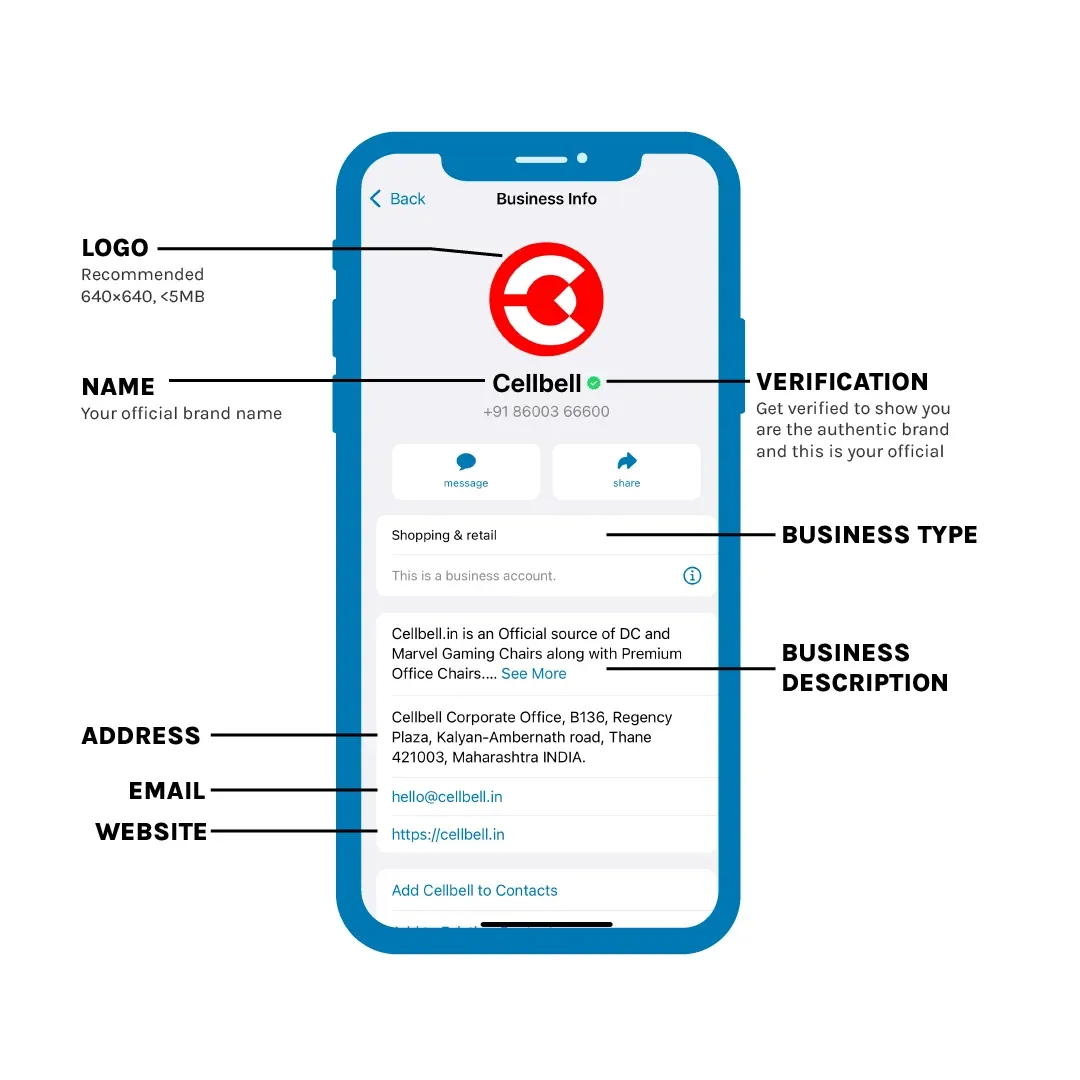
- Business profile: Display your business name, description, address, operating hours, category, email, and website, so customers find key information without asking.
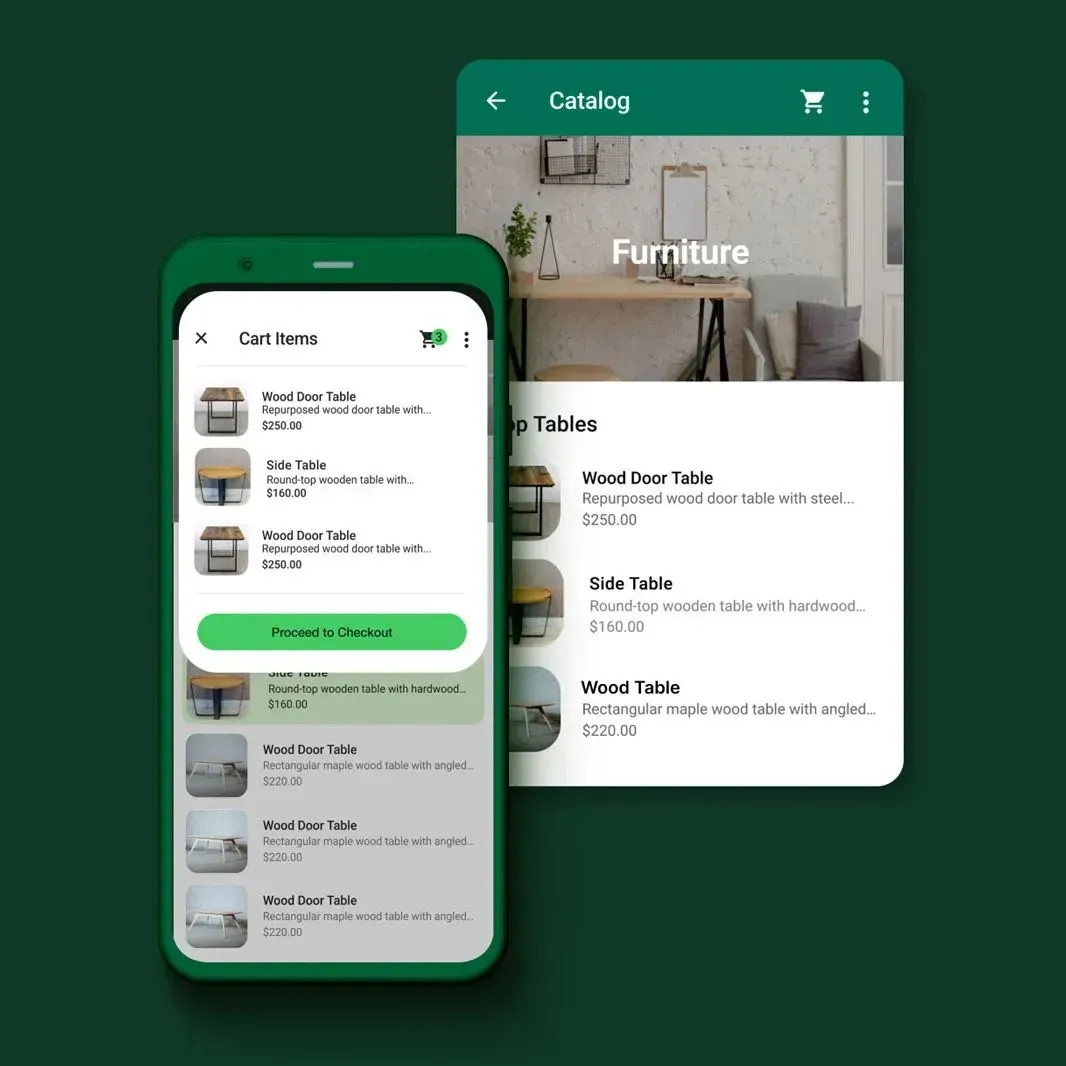
- Product catalog: Show your products or services with images, descriptions, and prices directly inside the chat.
- Automated messages: Set a greeting message for first-time contacts and an away message for outside business hours, so no customer is met with silence.
- Quick replies: Save frequent answers and send them with a keyword shortcut, speeding up responses to common questions.
- Labels: Group chats with labels like "New customer," "Pending payment," or "Completed" to keep your inbox organized.
- Message statistics: See how many messages were sent, delivered, and read to gauge how well your communication is working.
- Verified business badge: Eligible businesses can be verified, signaling to customers that the account is genuine.
Read more: WhatsApp Business API Guide
What Is the Difference Between WhatsApp Business and Regular WhatsApp?
The single biggest difference is intent. Regular WhatsApp is built for private conversations between people, while WhatsApp Business is built for companies, adding automation and organization tools that the personal app simply does not include. Everything else, from the profile to the catalog, labels, and statistics, flows from that difference in purpose.
| Feature | Regular WhatsApp | WhatsApp Business |
|---|---|---|
| Primary purpose | Personal communication | Business communication |
| Profile | Name, photo, status only | Full business profile: address, hours, category, website, catalog |
| Automated messages | None | Greeting message, away message, quick replies |
| Contact management | No categorization | Labels to group customers |
| Message statistics | Not available | Sent, delivered, and read stats |
| Number type | Mobile number only | Mobile or landline/office number |
| Cost | Free | Free |
In short, the differences come down to four areas:
- Profile and display. Regular WhatsApp shows only a name, photo, and status. WhatsApp Business shows a complete profile with address, operating hours, business category, website link, and a product catalog.
- Automated messages. Regular WhatsApp has no automation. WhatsApp Business includes greeting messages, away messages, and quick replies.
- Contact management and statistics. Regular WhatsApp cannot categorize contacts. WhatsApp Business adds labels to group customers and basic statistics on messages sent, delivered, and read.
- Number type and use. Regular WhatsApp registers with a mobile number only. WhatsApp Business also allows a landline or office number.
Difference 1: Profile and Display
Regular WhatsApp keeps things minimal. You get a display name, profile photo, and status, which is all a personal account needs.
WhatsApp Business turns that into a storefront. Customers can see your address, operating hours, business category, website, and a product catalog right inside the chat. For a business, this builds trust and answers common questions before they are even asked.
Difference 2: Automated Messages
Regular WhatsApp has no automation at all. Every message is typed by hand, which is fine for personal chats but slow for a business.
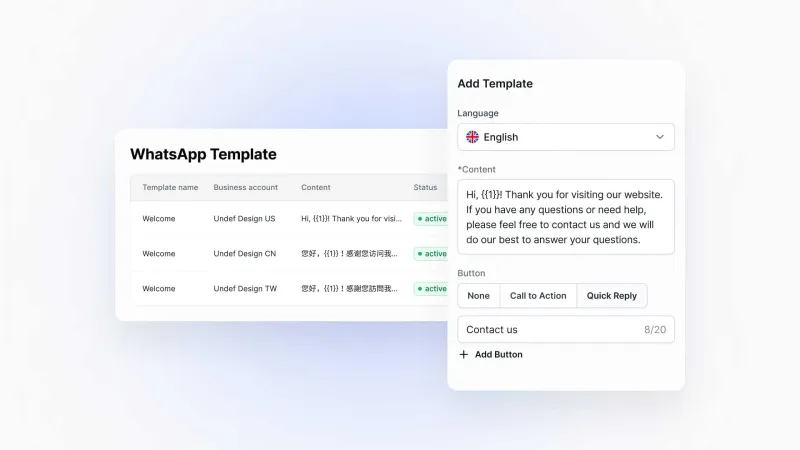
WhatsApp Business adds three built-in tools: a greeting message that welcomes first-time customers, an away message that replies outside business hours, and quick replies that send saved answers via a keyword shortcut.
Read more: WhatsApp Auto Replies
Difference 3: Contact Management and Statistics
Regular WhatsApp gives you a single, uncategorized contact list with no way to track where a conversation stands.
WhatsApp Business lets you tag chats with labels such as "New customer," "Pending payment," or "Completed," so you can follow up by priority and never lose track of a conversation. It also provides message statistics showing how many messages were sent, delivered, and read, which helps you evaluate whether your communication and campaigns are working.
Difference 4: Number Type and Use
Regular WhatsApp can only be registered with a mobile phone number, and it cannot broadcast to many contacts at once.
WhatsApp Business is more flexible. It also allows a landline or office number, which is useful for established businesses that operate on a fixed line, and it supports broadcasting a message to many contacts at once for promotions or announcements. Both apps can still be used on WhatsApp Web.
What Happens When WhatsApp Business Is No Longer Enough?
Regular WhatsApp has no business tools. WhatsApp Business adds them — but they still depend on someone being available to use them. The away message needs your phone online. Quick replies need an agent to send them. Labels need manual updating. At some point, "business" in the name starts to feel like a stretch.
That gap is what the WhatsApp Business API closes. Instead of tools you operate manually, you get automation that runs on its own:
- Replies that go out the moment a customer messages, day or night, based on what they actually asked
- AI that reads intent, not just keywords — trained on your products, policies, and FAQs
- One inbox where WhatsApp, Instagram, TikTok, and LINE all land together
- Handover rules so the right conversation reaches the right person at the right time
- Translation built in, so language is never the reason a sale falls through
The jump from WhatsApp Business to the API is not about features for their own sake. It is about removing the ceiling on how many customers you can serve well. SaleSmartly is one platform that makes that jump straightforward — free to start, no per-agent pricing. See how it works.
Conclusion
The difference between WhatsApp Business and regular WhatsApp comes down to purpose. Regular WhatsApp is for personal chats. WhatsApp Business adds the profile, catalog, automation, labels, and statistics that businesses need to serve customers professionally.
For most Indonesian businesses, WhatsApp Business is the obvious starting point. And when manual replies can no longer keep pace, the WhatsApp Business API through a platform like SaleSmartly is where you grow, especially once your customers are spread across more than one channel.
FAQ
What are the advantages of WhatsApp Business over regular WhatsApp?
WhatsApp Business adds business-only tools that the regular app lacks: a full business profile with address, hours, and a product catalog; automated greeting and away messages; quick replies; labels to organize customers; and message statistics. These help businesses respond faster, look more professional, and manage customers more efficiently, all for free.
What are the disadvantages of WhatsApp Business?
The main limitation is scale. The app's automation only covers basic greeting, away, and quick-reply messages, and these still require a person to manage conversations. It has no built-in chatbot, no multi-agent support, and limited reporting. Businesses with high message volume usually move to the WhatsApp Business API through a platform like SaleSmartly.
Is WhatsApp Business different from regular WhatsApp?
Yes. They share the same core messaging features, but WhatsApp Business is designed for companies and adds a business profile, product catalog, automated messages, quick replies, labels, and statistics. Regular WhatsApp is built for personal use and has none of these business tools.
Can WhatsApp Business see status?
Yes. WhatsApp Business can view and post status updates just like regular WhatsApp, since both run on the same platform. The business version simply adds extra tools on top. It does not remove any standard features such as status, calls, or media sharing.
How to Set Up Automatic Replies on WhatsApp: 3 Proven Methods
Learn how to set up automatic replies on WhatsApp with 3 methods: away messages, quick replies, and chatbot automation, in this step-by-step guide.
How to Register for WhatsApp Business: A Step-by-Step Guide
Register for WhatsApp Business in minutes: download, verify your number, and build your profile with this clear step-by-step 2026 guide.
