What Is a Broadcast? How Bulk Messaging Works and How to Do It Safely
Sending the same message to hundreds of customers one by one is impossible to sustain. A broadcast solves this by delivering one message to many recipients at once, while each person still receives it as a private, individual message. This guide explains what a broadcast is, how WhatsApp broadcast differs from a blast, how email blasts fit in, and the rules that keep your account safe.
What Is a Broadcast?
A broadcast is a single message sent to multiple recipients at the same time, where each person receives it privately rather than in a shared group.
The key difference from a group chat is privacy. Recipients do not see each other, and any reply comes back to you individually. This makes broadcasts ideal for announcements, promotions, event invitations, and reminders, where you want scale without starting a group conversation. The term applies across channels, from WhatsApp broadcasts to email blasts, but the mechanics and limits differ by platform.
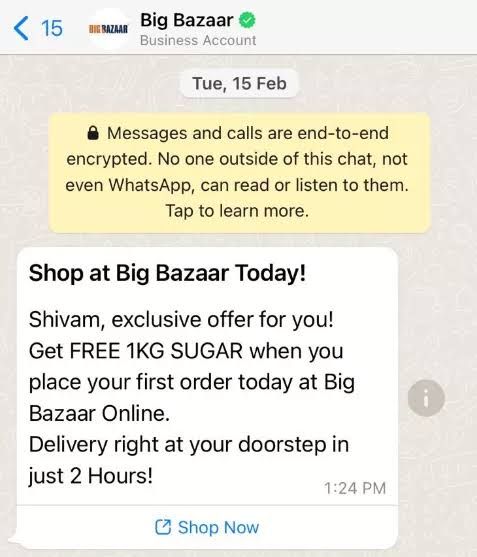
What Is the Difference Between a Broadcast and a Blast?
A broadcast and a blast both send bulk messages, but they differ in scale and infrastructure, especially on WhatsApp.
- WhatsApp broadcast: A free feature in the standard WhatsApp Business app. It caps each broadcast list at 256 contacts, and recipients only receive the message if they have saved your number in their phone.
- WhatsApp blast (WA Blast): Sending through the official WhatsApp Business Platform (API) or a certified provider. It removes the 256-contact list cap and reaches recipients whether or not they have saved your number, though it meters sending by 24-hour tiers and requires pre-approved templates.
The practical takeaway is that the free broadcast suits a small shop messaging its regulars, while the API-based blast is built for real scale.
If you are still setting up, this guide to registering for WhatsApp Business will have your back!
What About Email Blasts?
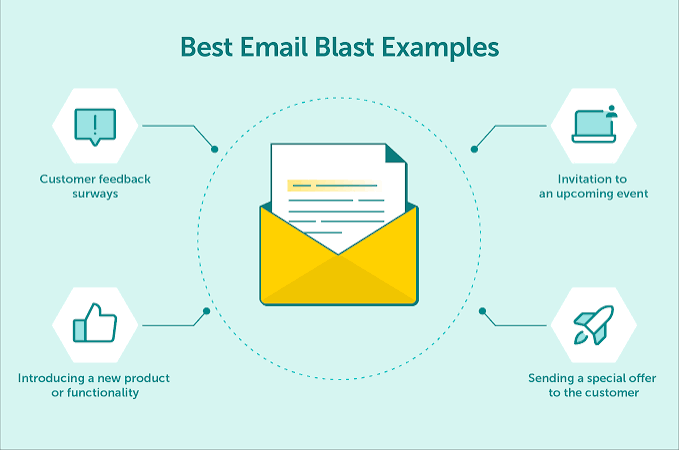
An email blast is the same broadcast principle applied to email, sending one message to a large list of subscribers at once.
Email blasts work well for newsletters, promotions, and announcements to an audience that has opted in. Like WhatsApp, the rules reward permission and personalization. Sending to people who never subscribed damages your sender reputation and lands messages in spam folders, the email equivalent of a WhatsApp block. The core discipline is identical across both channels: message only people who agreed to hear from you.
What Are Good Broadcast Message Examples?
A good broadcast message is polite, personalized, and straight to the point, so it does not read as spam. Below are two common examples for event invitations.
For a webinar or seminar invitation:
"Hello [Name], an exclusive invitation for you. We would like to invite you to our free webinar 'Business Strategy 2026' on Saturday, 10 September 2026 at 10:00 AM. Register here: [Link]. See you there!"
For an event or wedding invitation:
"Hello [Name], it would be an honor to have you at our wedding celebration on Sunday, 15 October 2026. Full details and location are in the digital invitation here: [Link]. Thank you."
Both open with the recipient's name, state the purpose clearly, and include a single link. That structure keeps the message personal and actionable, which is what separates a welcome invitation from an unwanted blast.
Read more:
How Do You Broadcast Without Getting Blocked?
Staying unblocked comes down to sending like a person, not a spam machine. These rules protect your account across WhatsApp and email alike.
- Get permission (opt-in): Only message people who gave you their number and agreed to be contacted.
- Personalize with a real name: Address the recipient by name at the start so the message feels human, not automated.
- Use official WhatsApp (API): Avoid modified (MOD) apps or illegal blast tools, which WhatsApp's security systems detect and ban quickly.
- Schedule sensibly: Do not fire thousands of messages in one second. Add a delay between messages if you use a sending tool.
- Avoid spam words: Cut all-caps text, excessive exclamation marks, and repeated phrases like "SO CHEAP" or "FREE" that trigger filters.
The biggest limitation of manual blasting is that it scales badly and risks your number. A safer path is an official platform that sends personalized, one-to-one messages and lets you handle replies in one place. Pairing broadcasts with an AI WhatsApp chatbot means the conversation continues automatically after the message lands, while team collaboration tools let your team manage every reply from one shared inbox.
Conclusion
A broadcast is one of the simplest ways to reach many people at once, whether through WhatsApp or an email blast, but the way you send it decides whether it builds trust or gets you blocked. The free WhatsApp broadcast works for a small, saved-number audience, while the official API-based blast handles real scale with proper opt-in and templates.
Whichever channel you use, the rules are the same. Message only people who agreed to hear from you, personalize every send, and keep the tone human. Do that, and a broadcast becomes a reliable way to announce, invite, and promote, rather than a fast route to a spam report.
FAQ
What is a broadcast message?
A broadcast message is a single message sent to many recipients at once, where each person receives it privately rather than in a group. They do not see who else received it, and replies come back to you individually. Broadcasts are commonly used for announcements, promotions, event invitations, and reminders across WhatsApp and email.
What is the difference between a WhatsApp broadcast and a WA blast?
A WhatsApp broadcast is a free app feature capped at 256 contacts per list, and it only reaches people who saved your number. A WA blast uses the official WhatsApp Business API or a certified provider, removing the list cap and reaching recipients without the saved-number requirement, though it requires opt-in and pre-approved message templates.
How do I send a broadcast without getting banned?
Send only to people who opted in, personalize each message with the recipient's name, and use the official WhatsApp Business API rather than modified apps or illegal blast tools. Space out your sends instead of firing thousands at once, and avoid spam triggers like all-caps and excessive exclamation marks. Permission and personalization are what keep your account safe.
Types of Chatbots: How to Choose the Right Platform for Your Business
A clear guide to the main types of chatbots, from rule-based to generative AI, with features, use cases, and how to choose the right one for your business.
Insurance Chatbot: Top 5 Platforms Compared for Indonesia (2026)
Compare the top 5 insurance chatbot platforms in Indonesia in 2026, covering sales, claims, and policy support, from insurtech leaders to smaller agencies.
